
Check out our White Paper Series!
A complete library of helpful advice and survival guides for every aspect of system monitoring and control.
1-800-693-0351
Have a specific question? Ask our team of expert engineers and get a specific answer!
Sign up for the next DPS Factory Training!

Whether you're new to our equipment or you've used it for years, DPS factory training is the best way to get more from your monitoring.
Reserve Your Seat Today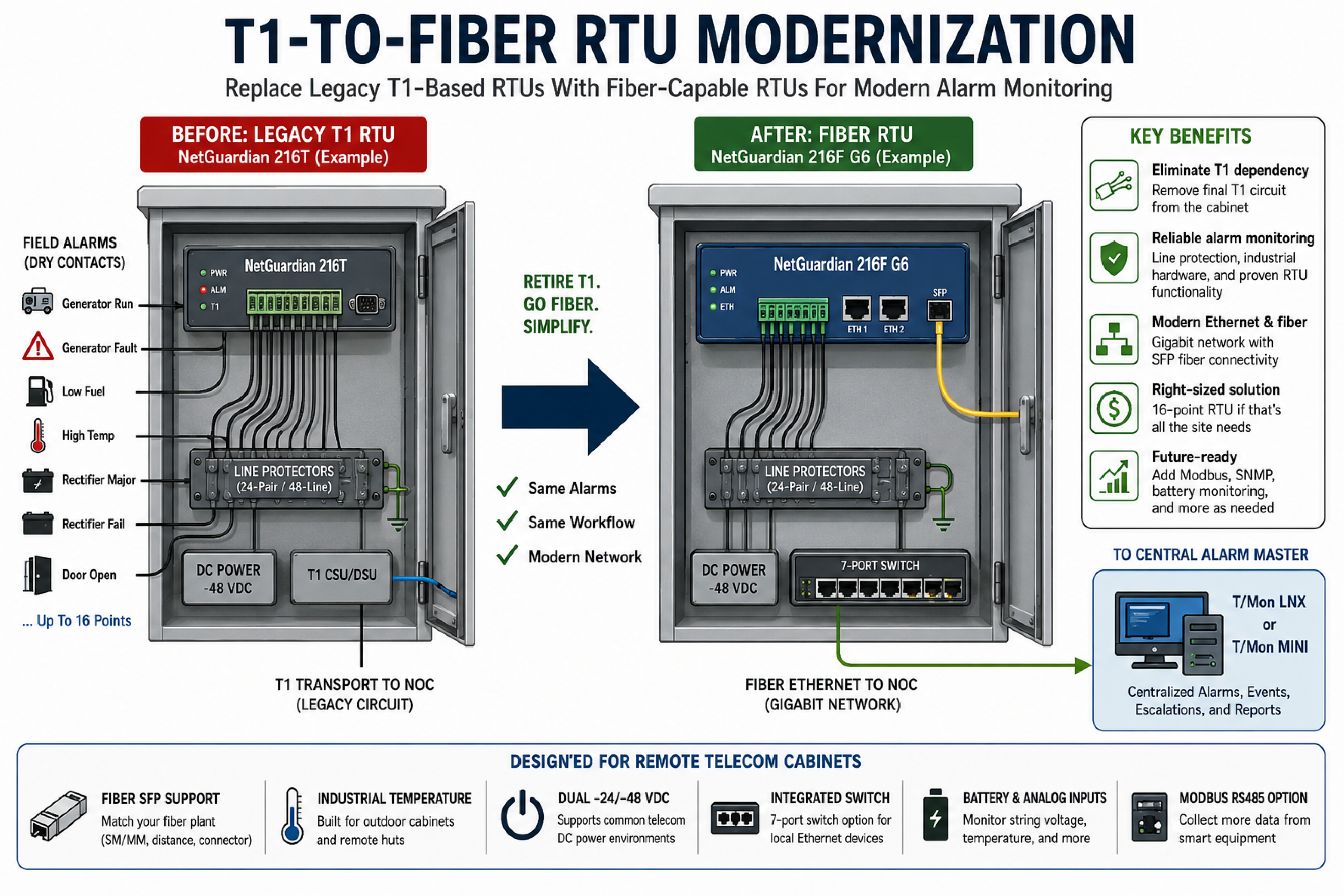
T1-to-fiber RTU modernization is the process of replacing remote telemetry units that depend on T1 transport with fiber-capable RTUs that report alarms over modern Ethernet and SFP fiber networks. For rural independent telecom providers, this work is often triggered by a simple problem: most T1 circuits have been retired, but a few remote cabinets still keep T1 service alive because legacy alarm remotes still need it.
A common upgrade pattern starts with older 16-point NetGuardian T1 remotes that still collect generator, rectifier, high-temperature, low-fuel, and door alarms. The best replacement is not automatically a larger 40-point unit. The best replacement is the smallest fiber-capable RTU that preserves alarm wiring, power requirements, NOC reporting, line protection, and future expansion options.
A remote telemetry unit, or RTU, is a field device that collects alarm inputs and reports status to a central monitoring system. A T1-to-fiber RTU upgrade replaces an RTU that depends on T1 transport with a unit that supports Ethernet and fiber SFP connectivity at the remote telecom cabinet.
In a telecom cabinet, a fiber RTU typically receives dry-contact alarms, analog values, temperature readings, and sometimes serial data from generators or other equipment. The RTU forwards those events to a NOC alarm platform so technicians can respond to generator faults, rectifier failures, cabinet heat, open doors, and battery issues.
The NetGuardian RTU family from DPS Telecom is commonly specified for remote telecom alarm collection because it supports contact alarms, analog monitoring, relay control, network reporting, and options that fit cabinet and hut environments. When replacing an older 216T-style T1 unit, a 216F G6-style fiber RTU can be a close fit when the site still needs about 16 discrete alarm points rather than a larger 40-point design.
T1 retirement is the operational process of removing legacy T1 circuits from a telecom network after voice, data, customer, or internal services have moved to Ethernet and fiber. A T1-based alarm RTU can become the last device that prevents a provider from removing old T1 equipment from a cabinet.
Legacy alarm transport can create several practical problems for a network team:
DPS Telecom recommends treating a T1-to-fiber RTU project as both an alarm modernization effort and a network clean-up effort. Replacing the alarm remote can allow the provider to remove the final T1 dependency from a cabinet while keeping the NOC's established alarm workflow intact.
RTU input sizing is the process of matching the number and type of alarm inputs on a replacement RTU to the alarms that are actually used at each site. Input sizing matters because overbuying unused points can raise project cost, while underbuying points can create a near-term expansion problem.
Many remote cabinets use only a handful of dry contacts, even when the installed RTU supports 16 alarm points. Common active alarms include generator running, generator fault, generator low fuel, high temperature, rectifier major alarm, and rectifier fail. Door open alarms may be active at some sites, but they should be verified before being carried into a new design.
A 40-point RTU can be the correct choice for sites with many discrete alarms, but a 40-point design can be unnecessary when no site uses more than about half of a 16-point unit. For a direct replacement of older 216T-style units, DPS Telecom may recommend evaluating a 216F G6-style 16-point fiber RTU before selecting a larger 240F-style 40-point platform.
| Replacement Choice | Best Fit | Risk To Check |
|---|---|---|
| 16-point fiber RTU | Remote cabinets with a small set of dry-contact alarms and a desire to preserve the legacy 16-point alarm layout. | Confirm that future generator, access, battery, and environmental alarms will still fit within available points. |
| 40-point fiber RTU | Larger sites, tandem locations, hubs, or cabinets with many discrete alarms and planned expansion. | A larger point count may add capacity that the site will not use. |
| 16-point RTU plus protocol options | Sites that use only a few contacts today but may later gather generator or equipment data over Modbus RS485. | Serial protocol support should be quoted and documented as an option when it is not needed on day one. |
The most reliable sizing method is to inventory active alarms before requesting final pricing. The input list should separate alarms that are currently wired, alarms that are still operationally useful, and alarms that were historically wired but are no longer needed.
Fiber RTU hardware specification is the process of selecting the physical, electrical, and environmental features required for a replacement unit to operate in the same cabinet as the legacy RTU. A telecom provider should confirm these requirements before purchasing a fleet of replacement units.
Important hardware features for a T1-to-fiber alarm RTU replacement include:
The DPS Telecom guide to choosing the right RTU is useful when teams need to compare alarm input count, power, transport, protocol support, and cabinet environment before placing an order.
Line protection is the practice of placing protective hardware between field alarm wiring and RTU inputs to reduce damage risk from lightning, induced surges, and other electrical events on copper alarm pairs. Remote telecom cabinets often keep line protection in the replacement design because the field wiring environment does not become risk-free when the transport changes from T1 to fiber.
For a 16-point dry-contact RTU that uses an Amphenol connector, line protector capacity should be checked in pairs. A 24-pair protector, sometimes described as a 48-line protector, can protect the 16 alarm pairs used by a 16-point RTU and still leave some spare protected conductors. A smaller 8-pair protector may require multiple units for the same 16-point use case, which can make installation less clean.
Amphenol cabling should be reviewed as a physical part of the cutover plan rather than treated as a minor accessory. An inline line protector intercepts alarm wiring between the field cable and the RTU, so the cabinet may need a jumper cable in addition to the field cable. A 20-foot Amphenol jumper can give technicians flexibility when the protector must be placed near a suitable grounding point, but final cable length should match the cabinet layout.
A field team should inspect existing Amphenol cables before reuse. Legacy cables may have the correct pinout but still have worn strain relief, damaged conductors, labeling problems, or limited length for the new line-protector location.
Analog battery string monitoring is the practice of using an RTU analog input to measure total DC battery string voltage instead of installing individual sensors on every battery jar. This approach can be a lower-cost way to detect overall voltage problems at remote cabinets when detailed per-battery visibility is not required.
Individual battery monitoring can provide more granular data, especially at larger sites with many batteries or more complex power plants. DPS Telecom offers a dedicated Battery Voltage Monitor for teams that need individual battery visibility as part of a broader power monitoring plan.
For smaller cabinet sites, using an available RTU analog channel for total string voltage can be practical. A +/-90 VDC analog input range, when specified for the RTU model, is suitable for common -48 VDC telecom string-voltage monitoring because it can read the expected plant voltage range. Technicians should still confirm input rating, polarity, fuse protection, grounding, scaling, and alarm thresholds before connecting battery plant wiring.
Battery string voltage monitoring is most useful when the NOC defines clear thresholds for normal float voltage, low-voltage warning, and critical low-voltage alarm. A general string reading will not identify a single weak battery, but it can alert the NOC when the overall DC plant is outside expected operating range.
Modbus RS485 processing is the ability of an RTU to poll or receive data from equipment that exposes alarm and status values over a serial Modbus interface. Generators, rectifiers, HVAC controllers, and other cabinet equipment may support Modbus even when the site currently uses dry contacts.
Dry contacts remain a good fit for simple alarms because they are easy to understand, easy to test, and do not require detailed register mapping. Modbus can become useful when a provider wants more alarm detail without adding a new copper pair for every status point.
| Alarm Method | Practical Advantage | Planning Requirement |
|---|---|---|
| Dry contacts | Simple wiring for generator run, generator fault, low fuel, rectifier major, and high temperature. | Requires one alarm pair per discrete status point. |
| Modbus RS485 | Can expose multiple data points from a generator or smart device over one serial connection. | Requires register mapping, serial settings, and optional RTU protocol processing support. |
| SNMP or mediated alarm data | Can integrate IP-based equipment alarms into the NOC workflow. | Requires alarm normalization so operators receive useful events rather than raw device messages. |
DPS Telecom's approach to protocol mediation helps explain how different alarm protocols can be normalized for NOC use. If Modbus-capable generators are present but not used yet, it is often practical to quote Modbus RS485 processing as a separate option so the provider can add smarter alarm collection later.
Pinout compatibility is the alignment of field alarm wiring on the legacy RTU connector with the input positions on the replacement RTU connector. Pinout compatibility is important because a physically similar replacement can still create cutover problems if alarm pairs land on different input numbers.
A low-risk RTU replacement should preserve the existing 16-point alarm mapping when possible. This is especially important when technicians plan to reuse field cables, reuse cabinet labels, and keep the same alarm definitions in the NOC.
The legacy RTU upgrade path from DPS Telecom is intended for teams that need to preserve remote visibility while replacing older monitoring hardware. DPS Telecom can help verify model selection, pinout expectations, and configuration details before field work begins.
An alarm master is a central system that collects, normalizes, displays, escalates, and forwards alarms from many remote sites. In a telecom NOC workflow, the alarm master is the point where RTU events become actionable tickets, dispatch decisions, and operational records.
A T1-to-fiber RTU project should preserve the NOC workflow that technicians already use. A T/Mon alarm master, including T/Mon LNX or T/Mon MINI depending on system scale, can collect alarms from DPS RTUs and present them in a centralized alarm environment.
Protocol mediation matters when the network includes a mix of older dry-contact alarms, fiber RTUs, SNMP devices, Modbus devices, and legacy systems. Mediation reduces tool sprawl by translating different device messages into a consistent alarm format that NOC operators can understand.
Some NetGuardian RTUs can also receive, process, and act on SNMP traps from nearby devices. The DPS Telecom article about using NetGuardian RTUs to receive SNMP traps is relevant when cabinet devices already generate SNMP events and the provider wants local alarm handling before forwarding events to the central alarm master.
An RTU replacement checklist is a structured set of technical questions that prevents the quote from being based only on a legacy part number or an oversized default model. A good checklist compares installed conditions, current alarms, future needs, and installation constraints.
A checklist helps purchasing, engineering, and operations compare a 16-point fiber RTU with a larger model using actual requirements. The result is a quote that reflects the alarms in the cabinet instead of carrying unused capacity from a previous design.
The safest replacement method is to inventory existing alarms, confirm pinout compatibility, match the fiber SFP requirement, preserve line protection, and test each alarm from the field device to the NOC. A direct 16-point fiber replacement can reduce cutover complexity when the legacy unit also used 16 alarm inputs.
A telecom provider should choose a 40-point fiber RTU only when the site needs the added alarm capacity or has a defined expansion plan. If the site uses only a small set of dry contacts and does not exceed 16 points, a 16-point fiber RTU is often the more appropriate design to evaluate.
Existing Amphenol cables may be reusable if the pinout, connector condition, length, labeling, and grounding plan still fit the replacement design. Line protection can change the cable path, so the installation plan should confirm whether a jumper cable is required between the protector and the RTU.
An RTU analog input can monitor total battery string voltage if the input range is rated for the DC plant voltage and the wiring is designed correctly. A +/-90 VDC input range can support common -48 VDC string-voltage monitoring when polarity, fuse protection, scaling, and thresholds are correctly configured.
Modbus RS485 is not required when basic generator alarms are already available as dry contacts. Modbus RS485 becomes useful when the provider wants more detailed generator status, fewer discrete alarm pairs, or future support for smarter cabinet equipment.
DPS Telecom can help compare older T1-based NetGuardian remotes with fiber RTU options, verify feature requirements, review line protection and cable needs, and plan NOC integration. The goal is to preserve the useful alarm workflow while removing the T1 dependency.
A DPS Telecom consultation is a technical review of legacy alarm remotes, fiber transport requirements, cabinet wiring, line protection, battery monitoring, optional protocol processing, and NOC reporting goals. If your team is retiring T1 service, replacing older 216T-style remotes, or comparing a 16-point fiber RTU against a larger unit, DPS Telecom can help define a practical upgrade path.
Get a Free Consultation to review fiber SFP requirements, alarm input counts, pinout compatibility, Modbus options, battery monitoring, and central alarm integration with a DPS Telecom specialist.

Andrew Erickson
Andrew Erickson is an Application Engineer at DPS Telecom, a manufacturer of semi-custom remote alarm monitoring systems based in Fresno, California. Andrew brings more than 19 years of experience building site monitoring solutions, developing intuitive user interfaces and documentation, and opt...


