
Check out our White Paper Series!
A complete library of helpful advice and survival guides for every aspect of system monitoring and control.
1-800-693-0351
Have a specific question? Ask our team of expert engineers and get a specific answer!
Sign up for the next DPS Factory Training!

Whether you're new to our equipment or you've used it for years, DPS factory training is the best way to get more from your monitoring.
Reserve Your Seat TodayThe best remote power switch for your sites is one that matches your power type (AC or DC), supports the management protocols you already use, and gives you enough outlets and monitoring inputs to handle each location without extra hardware. For most telecom, utility, and IT operations managing unmanned sites, that means looking beyond outlet count and thinking about security, environmental monitoring, and automation as part of the same decision.
At DPS Telecom, we've helped more than 1,500 organizations manage remote site infrastructure across networks ranging from a handful of locations to deployments in the thousands. One thing we hear consistently: the cost of a single unnecessary truck roll often exceeds what the switch itself costs. A remote power switch that lets you reboot a frozen router or power-cycle an unresponsive device from your desk typically pays for itself after the first avoided dispatch. According to Gartner, the average cost of IT downtime runs into the thousands of dollars per minute, which makes fast remote recovery a measurable financial priority, not just a convenience.
This guide walks through what actually matters when selecting a remote power switch, so you can make a decision that holds up as your network grows.
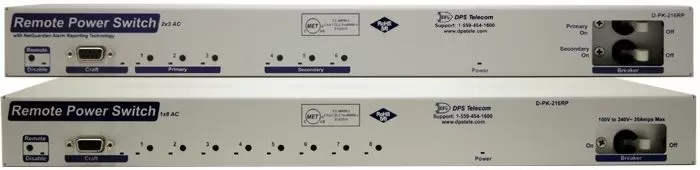
A remote power switch (also called an intelligent PDU or network power switch) lets you control power to individual outlets over a network connection. You can turn circuits on or off, reboot devices, and monitor power conditions without anyone physically visiting the site.
Without this capability, restoring a hung device means dispatching a technician. For a remote tower, a rural substation, or a roadside cabinet, that can mean hours of drive time and hundreds of dollars in labor for what amounts to a 10-second fix. The math changes quickly once you start multiplying that across dozens of sites.
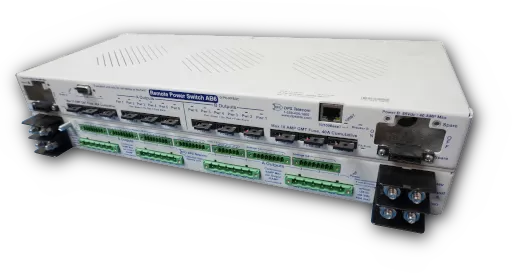
Before evaluating any other spec, you need to know whether your sites run on AC or DC power. This single factor narrows the field considerably, and choosing the wrong type creates real compatibility and safety problems.
AC remote power switches are designed for standard 120/240VAC environments. They work well in data centers, server rooms, and branch offices with conventional power infrastructure.
DC remote power switches are built for telecom and industrial environments running on battery-backed DC plant, typically at -48V, though 24V and 12V are also common. Telecom base stations, fiber huts, and utility sites almost always fall into this category.
Some deployments have both AC and DC equipment on the same site. In those cases, look for a vendor that offers both models under a common management framework, so you are not running two separate systems with two separate support relationships.
Our Remote Power Switch DC can handle 12V, 24V, and 48V loads simultaneously on a single chassis and supports different polarities per output. For mixed-voltage telecom environments, that flexibility means one unit can cover what would otherwise require separate hardware for each voltage level.
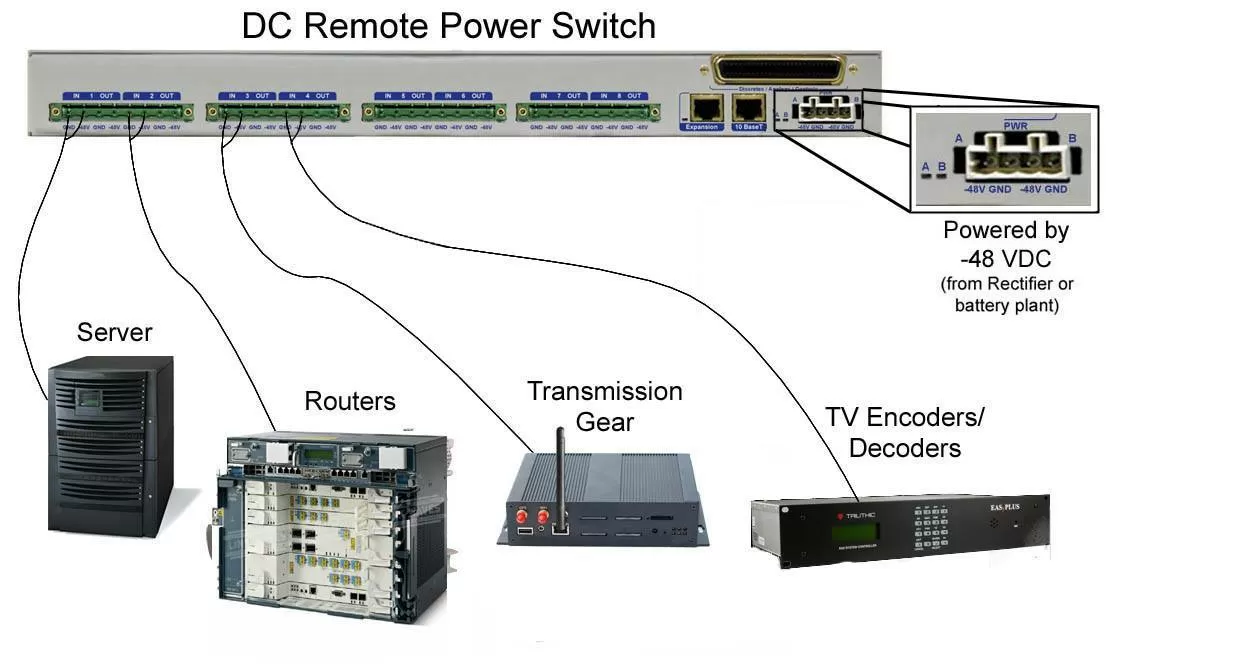
Start by counting the devices you need to control at each site, then add headroom for growth. Models vary significantly in how they divide inputs and outputs.
Common configurations include 2 inputs with 3 outlets each, which lets you load-balance across circuits, or 1 input with 8 outlets for simpler sites. Make sure the unit you choose can handle your total load across all circuits without running near its rated capacity under normal operating conditions.
If your network is growing, check whether the unit supports daisy-chaining. Some switches include an expansion port that lets you link additional units under a single IP address. That keeps management simple as site complexity increases, without requiring a full hardware replacement.
The switch needs to fit into your existing management workflow, not the other way around. Most modern units support Ethernet with an HTTPS web interface and SNMP, which covers the majority of deployments.
If your sites rely on out-of-band management via cellular or dial-up backup, confirm the switch supports those paths before committing. And if you are already running an SNMP manager like SolarWinds or a dedicated network management system, verify the switch supports the SNMP version you use (v1, v2c, or v3). A unit that only supports v1 will not integrate cleanly into a v3 environment.
Access control matters at any site, and especially at unmanned ones. Look for:
Our Remote Power Switch AC and DC models both support up to 10 user profiles with individual credentials and access rights. That means you can give field technicians outlet-level access without handing them admin credentials, which matters when you have contractors or rotating staff visiting sites.
A remote power switch that only controls outlets is a missed opportunity. That same device, already sitting at your remote site, can collect temperature data, monitor fuse status, measure current draw per input, and trigger alerts before a condition becomes an outage.
Look for units that include internal temperature sensing as a baseline, with ports for external sensors if your environment warrants it. Our switches include internal and external temperature monitoring with configurable alarm thresholds. When conditions fall outside acceptable ranges, the unit sends SNMP traps or email alerts automatically.
We have seen sites where a cooling failure was the root cause of repeated device reboots that looked like software issues. A switch reporting site temperature would have identified the real problem immediately, saving hours of troubleshooting time and an unnecessary dispatch.
Manual reboots solve the problem in front of you. Automation prevents the next one. Useful features to look for include:
These are the features that reduce the volume of overnight calls and weekend dispatches. Once they are configured, they run without any human involvement.
For sites where power continuity is non-negotiable, look for units with dual A/B power inputs. If one feed fails, the other maintains output without interruption. This is standard practice in telecom environments, but worth confirming as a specific configuration option rather than assuming it is included in every model.
| Feature | AC Remote Power Switch | DC Remote Power Switch |
|---|---|---|
| Power Type | 120/240VAC | 12V / 24V / 48V DC |
| Typical Use Cases | Data centers, offices, server rooms | Telecom sites, battery plant, industrial |
| Mixed Voltage Support | Not applicable | Yes (multiple voltages on one chassis) |
| Input Configuration | 1 or 2 AC inputs | Single or dual A/B redundant DC inputs |
| Output Count | 6-8 switched outlets | Up to 8 switched DC outputs |
| Current Monitoring | Per-input current draw | Per-output load metering |
| Fuse Monitoring | Not typical | Yes, with alarm on fuse fault |
| RTU Option | Optional (adds discrete inputs, analog, controls) | Optional (adds discrete inputs, analog, controls) |
| Protocol Support | SNMP v1/v3, HTTPS | SNMP, HTTPS, RS-232, CLI |
| Expansion | Daisy-chain via expansion port | Same |
If you are building out monitoring at sites that currently have no remote visibility, this question is worth asking before you spec your hardware.
A standard remote power switch handles outlet control and basic power monitoring. An integrated unit adds remote telemetry unit (RTU) functionality: discrete alarm inputs, analog sensor inputs, and control relay outputs, all in the same 1U chassis. In practical terms, that means you can replace both a fuse panel and a standalone RTU with a single device, reducing rack space, simplifying cabling, and consolidating your vendor relationships.
Our Smart Fuse Panel Remote Power Switch is available with optional RTU functionality, including 16 discrete inputs, 4 analog inputs, and 2 discrete controls. For sites being built out or upgraded, that can significantly simplify the bill of materials and the ongoing support picture.

Assuming AC and DC models are interchangeable. They are not. DC power switches require proper handling of voltage polarity and fuse monitoring that AC units do not address. Using the wrong type creates compatibility and safety issues that are difficult to diagnose after the fact.
Buying for today's site, not tomorrow's. If you are deploying 20 switches now and expect to add monitoring inputs at those sites over the next two years, a switch with RTU expansion capability means you will not need to rip and replace later. The incremental cost difference is almost always smaller than a second deployment.
Ignoring the management integration question. A switch with a solid web interface but no SNMP support may not fit into your centralized monitoring workflow at all. Confirm protocol compatibility before ordering, especially if you are standardizing across a large number of sites.
Underestimating the value of temperature monitoring. Environmental visibility pays for itself in ways that are not always obvious until something goes wrong. A switch that reports site temperature gives you an early warning system for cooling failures that would otherwise only become visible after equipment starts going down.
The terms are often used interchangeably. Both allow per-outlet switching via a network interface. "Smart PDU" sometimes implies additional features like energy metering and load monitoring, but there is no strict industry standard for the distinction. Evaluate specific features rather than relying on product category names.
You can, but it complicates remote access. Dynamic IP addresses make it harder to consistently reach the unit from outside the local network. For any site where you plan to manage the switch remotely over the internet, a static IP or a dynamic DNS solution is worth the effort to configure.
Count every device you want to control individually, then add 20-30% headroom for future additions. If you need to control 5 devices independently, a 6-outlet unit leaves very little room. An 8-outlet unit gives you more flexibility without a significant cost difference.
Yes, as long as the switch supports the SNMP version your manager uses. Confirm SNMPv3 support if you need encrypted SNMP communication (v3 adds authentication and encryption that earlier versions lack). Most enterprise-grade switches include MIB files you can import into your SNMP manager for full integration.
Specs get you to a shortlist. A few other factors are worth weighing before the final decision.
Build quality and operating range. Remote sites are not climate-controlled server rooms. Look for units rated to operate across a wide temperature range. Our Remote Power Switch units are rated from 0 to 60 degrees Celsius and built on a powder-coated steel chassis, which holds up in the kinds of environments where this equipment actually gets deployed.
US-based manufacturing and engineering support. When something goes wrong, turnaround time and technical depth matter. Our equipment is manufactured in Fresno, California, and technical support is handled by application engineers with direct knowledge of the product, not a generalist help desk.
Customization options. Standard configurations cover most deployments, but edge cases exist. We regularly configure units to match specific client requirements, sometimes at no additional charge, rather than asking clients to work around a mismatch between the product and their application.
Long-term reliability. Remote power management is infrastructure. You want a vendor whose product will still be supported in 10 years. DPS Telecom has been building field-proven monitoring equipment since 1986, and many of our original clients continue to rely on our equipment today.
If you are evaluating options for your network, our engineering team is available to talk through your specific sites and help you identify the right configuration. Visit dpstele.com or call 1-800-622-3314 to get started.

Andrew Erickson
Andrew Erickson is an Application Engineer at DPS Telecom, a manufacturer of semi-custom remote alarm monitoring systems based in Fresno, California. Andrew brings more than 19 years of experience building site monitoring solutions, developing intuitive user interfaces and documentation, and opt...


