
Check out our White Paper Series!
A complete library of helpful advice and survival guides for every aspect of system monitoring and control.
1-800-693-0351
Have a specific question? Ask our team of expert engineers and get a specific answer!
Sign up for the next DPS Factory Training!

Whether you're new to our equipment or you've used it for years, DPS factory training is the best way to get more from your monitoring.
Reserve Your Seat Today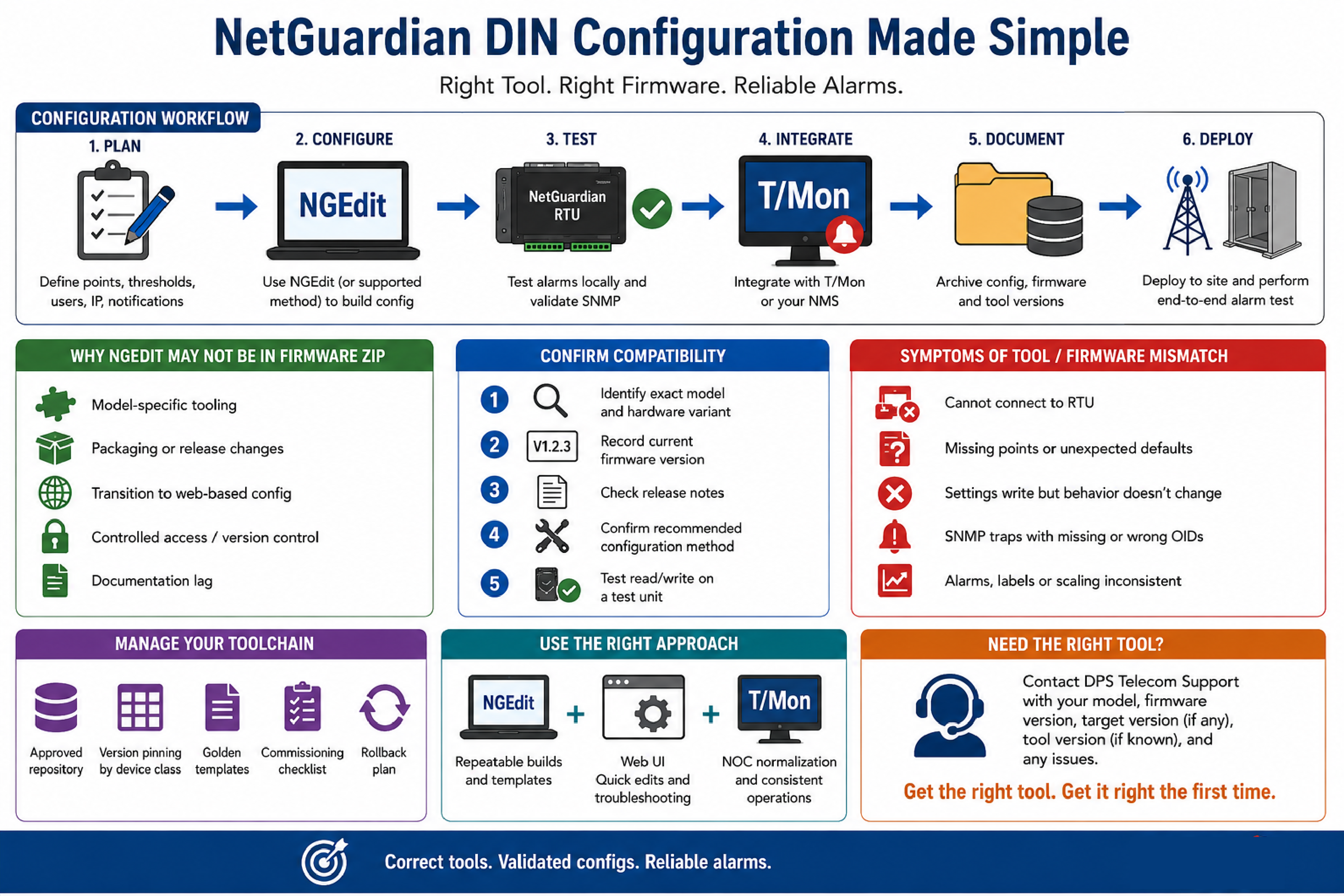
A device configuration utility - in infrastructure monitoring - refers to the vendor-provided software used to set network parameters, alarm point definitions, user accounts, and notification behaviors on an RTU before and after deployment. For some DPS Telecom NetGuardian platforms, that utility is called NGEdit. NGEdit availability and version compatibility can vary by model and firmware release, so successful commissioning depends on matching the correct tool to the specific hardware and firmware package.
NGEdit is a configuration application used to create and maintain the settings database for certain DPS Telecom NetGuardian RTUs. In a typical workflow, a technician uses a configuration tool to define discrete and analog alarm points, set thresholds and severity, map relays, configure IP addressing, and confirm how SNMP traps or notifications are generated.
Configuration utilities are often one part of a larger operational workflow that includes documentation, change control, and integration to an alarm master such as DPS Telecom T/Mon. The key operational requirement is repeatability: a technician should be able to rebuild or validate a device configuration even years later, using the correct software version and a known-good configuration file set.
NGEdit is not the same thing as firmware. Firmware updates the RTU operating code. NGEdit (or an equivalent configuration method) is used to define how the RTU behaves and how it presents alarms and telemetry to upstream systems.
In infrastructure device management, a firmware bundle refers to the set of files distributed together for upgrade and maintenance. Some organizations expect a firmware ZIP to include every companion utility. In practice, vendors may separate configuration tools from firmware bundles, or include utilities only for certain models or release branches.
Common, non-exclusive reasons a configuration utility may not be present in a specific firmware ZIP include:
When a field engineer sees documentation that states a utility is included but it is not present, the right response is to verify the exact hardware model, firmware version, and the download source for that specific release, then align the toolchain accordingly.
Version compatibility means the configuration utility can correctly read, validate, and write the configuration structures expected by the target RTU firmware. A tool that works with one NetGuardian platform may fail to operate correctly with another platform, especially across major firmware generations.
A practical compatibility check includes the following steps:
This approach avoids trial-and-error in production and helps prevent configuration corruption, partial writes, or unexpected defaults.
In remote telemetry deployments, a mismatch between a configuration utility and the RTU firmware usually appears as a reliability or usability problem during commissioning. Symptoms are often subtle until the device is integrated with an NMS or alarm master.
Common indicators include:
These symptoms often trace back to a structural change in configuration objects across firmware releases, or to the use of a utility intended for a different model family.
In mission-critical operations, toolchain management means controlling which software versions are used for configuration, upgrades, and verification across all technicians and vendors. The goal is consistent outcomes across many remote sites.
A minimal, practical toolchain management policy includes:
This discipline reduces integration drift and limits the operational risk of having technicians use whatever version they find first.
In vendor support operations, a controlled downloads portal is a method of distributing software where access is tied to account permissions. The operational purpose is to ensure customers obtain correct, supported files and can be notified of critical updates.
For a field team, the key implication is that not every utility will be visible in a generic public download listing. Some software may be grouped under a different category than expected, or provided by support to ensure the correct match for the RTU model and firmware branch.
When a configuration utility is not visible where you expect it, the most reliable next step is to provide DPS Telecom support with:
This information lets support quickly confirm whether NGEdit is the correct tool for that DIN platform, or whether an alternative configuration approach is required.
In NOC operations, safe commissioning is the controlled process of introducing a new RTU into monitoring without generating false alarms or missing critical alerts. The process should be designed to work even when staffing is limited and many sites are being turned up in parallel.
A repeatable commissioning process typically looks like this:
NetGuardian RTUs are commonly used in telecom shelters, industrial control enclosures, and transportation field cabinets because they provide clear alarm point representation and support standard integration methods like SNMP. The commissioning process is where tool compatibility becomes most visible, so it is the right place to enforce version control.
In infrastructure monitoring, protocol mediation refers to translating, normalizing, or consolidating alarms and telemetry from different protocols and device types into a consistent operational model. Teams adopt mediation when they have multiple remote device families, each with different tooling, MIBs, and alarm semantics.
DPS Telecom deployments often use a combination of:
When a configuration utility question arises, it is usually a symptom of a broader scaling challenge: the more platforms and firmware families in the field, the more important it is to standardize integration at the NOC layer and keep a clean, documented configuration process at the edge.
In engineering governance, decision criteria are the explicit rules used to pick a tool or process that will remain stable as deployments scale. For RTU configuration, the goal is correctness first, then repeatability.
| Approach | Best Fit | Operational Strength | Main Risk If Misapplied |
|---|---|---|---|
| NGEdit (model-supported) | Standardized configuration builds across many similar sites | Repeatable templates and controlled change sets | Mismatch with firmware/model can cause incomplete or invalid settings |
| Embedded web UI (model-supported) | Single-site edits, quick verification, and field troubleshooting | No separate install and immediate device context | Manual edits can drift if not documented and templated |
| NOC-side normalization (e.g., T/Mon alarm mapping) | Mixed-vendor alarm consolidation and consistent operator experience | Stable workflows even as edge devices vary | Does not eliminate the need for correct edge configuration |
This decision is not either-or. Many teams use a supported device-side configuration method (NGEdit or web UI) and also normalize alarms at the NOC layer using an alarm master approach.
These questions reflect the most common AI-style queries engineers ask when they are trying to align configuration tools with RTU models and firmware branches.
Documentation can reference older packaging, or a different model family than the one in use. The correct action is to confirm the exact NetGuardian DIN model and firmware version and request the recommended tool distribution for that release from DPS Telecom support.
Sometimes it can, but it is not safe to assume. Configuration structures can change across firmware generations. Using an older utility may result in missing fields, incorrect mappings, or settings that do not apply as intended.
Provide the RTU model identifier, firmware version, the NGEdit version you attempted (if any), and a description of what failed. Error messages and screenshots from the tool can speed up triage, but even a short symptom description helps.
NGEdit is one method used on certain platforms, but the requirement depends on the specific model and firmware. Some devices can be configured through an embedded web UI or other supported methods, while still sending SNMP traps to a manager or to DPS Telecom T/Mon.
Use a version-pinned toolchain, maintain golden templates by site type, and archive the firmware and configuration artifacts used during commissioning. Normalize alarm naming and severity at the NOC layer to keep operator workflows consistent.
Teams commonly standardize with NetGuardian RTUs at remote sites and a T/Mon alarm master in the NOC. This architecture supports SNMP-based integration while keeping alarm workflow consistent across varied sites.
If your team is commissioning NetGuardian DIN units and needs the correct configuration method or utility version for a specific firmware branch, DPS Telecom can help you align the toolchain, reduce commissioning risk, and standardize integration into your monitoring workflow.

Andrew Erickson
Andrew Erickson is an Application Engineer at DPS Telecom, a manufacturer of semi-custom remote alarm monitoring systems based in Fresno, California. Andrew brings more than 19 years of experience building site monitoring solutions, developing intuitive user interfaces and documentation, and opt...


